partition_graph#
- m4opt.utils.optimization.partition_graph(graph, n, recursive=None, node_weight=None, edge_weight='weight', **kwargs)[source] [edit on github]#
Partition a graph into contiguous subgraphs.
Partition a graph into subgraphs using METIS. [1][2][3]
- Parameters:
graph (Graph) – A graph in the form of a
networkx.Graphobject.n (int) – The desired number of partitions. The returned number of partitions may be smaller.
recursive (bool | None) – Whether to use recursive or K-way partitioning.
node_weight (str | None) – Optional key for node weights.
edge_weight (str) – Optional key for edge weights.
kwargs – Additional arguments passed to
pymetis.Options.
- Returns:
Partition assignments for all nodes.
- Return type:
References
Notes
If the graph has edge weights, then the weights must be integer-valued.
Example
from matplotlib import pyplot as plt
from m4opt.utils.optimization import partition_graph
import networkx as nx

graph = nx.triangular_lattice_graph(10, 20)
part = partition_graph(graph, 5, seed=42)
ax = plt.axes(aspect=1)
nx.draw(
    graph,
    ax=ax,
    pos=nx.get_node_attributes(graph, "pos"),
    node_size=50,
    node_color=part,
    cmap="prism",
)
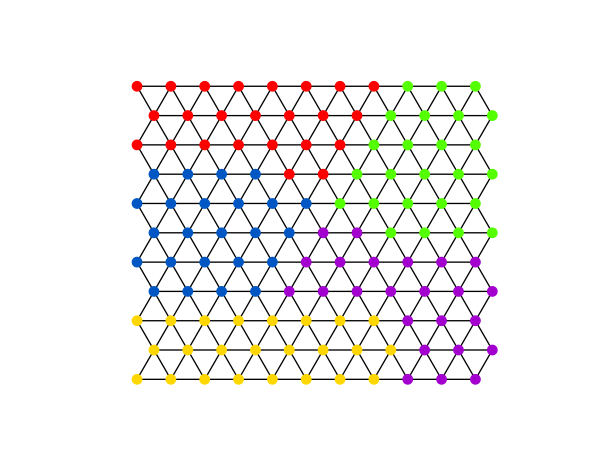
Basic example of graph partitioning.#
from matplotlib import pyplot as plt
from m4opt.utils.optimization import partition_graph
import networkx as nx
import numpy as np

graph = nx.triangular_lattice_graph(30, 50)
center = np.mean(list(nx.get_node_attributes(graph, "pos").values()), axis=0)
for node, data in graph.nodes(data=True):
    data["distance"] = np.ceil(np.sqrt(np.sum(np.square(node - center))) ** 3).astype(
        np.intp
    )

part = partition_graph(graph, 50, seed=42, node_weight="distance")
ax = plt.axes(aspect=1)
nx.draw(
    graph,
    ax=ax,
    pos=nx.get_node_attributes(graph, "pos"),
    node_size=50,
    node_color=part,
    cmap="prism",
)

Graph partitioning with node weights (larger weights toward center).#